Source: FBI Internet Crime Complaint Center — PSA260521 · Issued May 21, 2026
Multi-factor authentication has been the gold standard for account security for years. The advice has been consistent: turn on MFA and you’re protected.
That advice is no longer enough on its own.
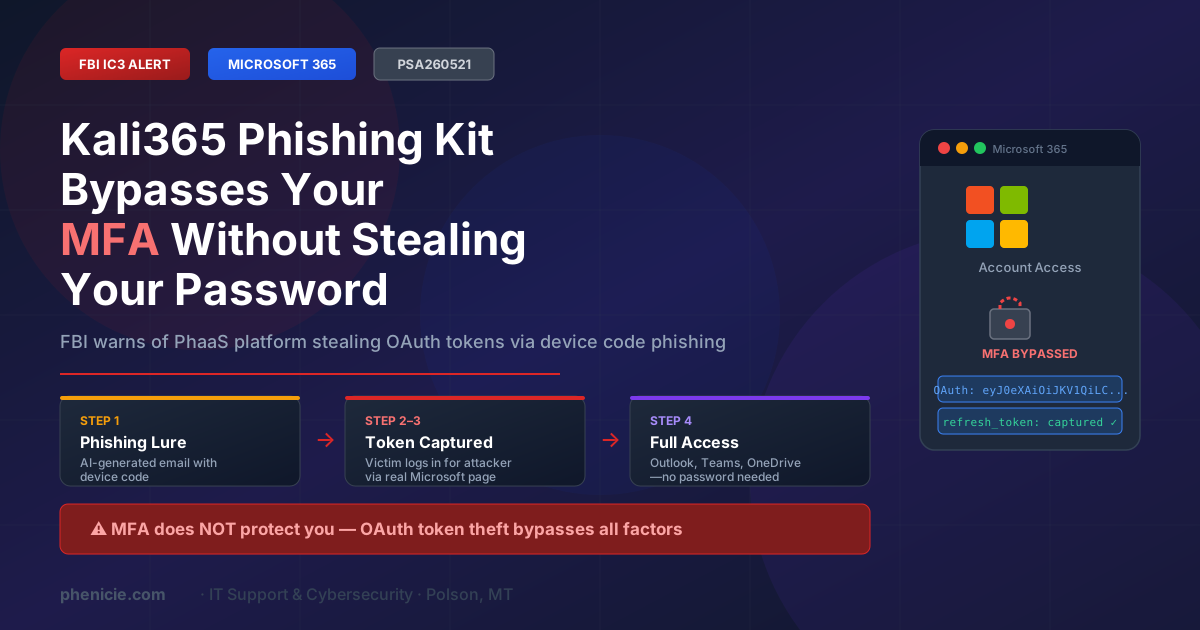
On May 21, 2026, the FBI’s Internet Crime Complaint Center issued a public service announcement warning about Kali365 — a new Phishing-as-a-Service (PhaaS) platform that bypasses Microsoft 365 MFA entirely by stealing OAuth access tokens instead of your password. It has been circulating on Telegram since April 2026.
Once an attacker has your token, they don’t need your password. They don’t need to pass your MFA challenge. They can access your Outlook, Teams, and OneDrive — indefinitely — as if they were you.
What Makes Kali365 Different
Most phishing attacks try to steal your username and password. Security teams have built defenses around that model: MFA adds a second factor so a stolen password alone isn’t enough.
Kali365 sidesteps the password entirely. It uses a technique called device code phishing — a legitimate Microsoft authentication flow that was designed for devices without keyboards, like smart TVs and printers. Attackers have weaponized it.
The result:
- Your password is never compromised
- Your MFA challenge is never triggered
- The attacker gets a token that grants full access — and keeps working until it’s manually revoked
The platform also lowers the barrier for less-skilled attackers. Kali365 provides AI-generated phishing lures, automated campaign templates, real-time tracking dashboards, and OAuth token capture — all in a subscription service available on Telegram.
How the Attack Works: Step by Step
The FBI outlines four stages. Here’s what each one looks like from the victim’s perspective.
The Lure
You receive a phishing email impersonating a trusted cloud service — Microsoft, Dropbox, SharePoint, or a document sharing platform. The email contains a device code and instructions to visit a real Microsoft verification page and enter it.
The Authorization
You navigate to the legitimate Microsoft page and paste in the code. Microsoft’s device authentication flow treats this as you approving access for a device. Unknowingly, you’ve just authorized the attacker’s device to access your account.
Token Theft
The Kali365 platform captures your OAuth access token and refresh token. These tokens are what Microsoft uses to keep you logged in — they grant access without requiring your password or MFA again.
Persistence
The attacker now has full access to your Microsoft 365 environment — Outlook, Teams, OneDrive — with no password and no MFA. Refresh tokens automatically renew access, meaning the attacker stays in until the token is explicitly revoked.
Who Is at Risk
Any organization using Microsoft 365 is a potential target — including small businesses and nonprofits in Western Montana. Device code phishing is particularly effective against employees who:
How to Protect Your Organization
The FBI’s recommendations center on restricting or eliminating device code flow in your Microsoft 365 tenant. Here is what to do, translated for non-technical business owners.
1. Create a Conditional Access Policy to Block Device Code Flow
In Microsoft Entra ID (formerly Azure AD), create a policy that blocks the device code authentication flow for all users. This is the most direct mitigation. Work with your IT provider to configure exceptions only for legitimate business needs — such as printers or conference room displays that require it.
2. Audit Device Code Flow Usage Before Blocking
Before applying the block, review your Microsoft Entra sign-in logs to identify any legitimate device code flow usage. This prevents accidentally locking out real business processes like shared devices or automation tools.
3. Block Authentication Transfer Policies
Prevent users from transferring an authentication session from a computer to a mobile device. This closes a related attack vector that some PhaaS platforms exploit.
4. Protect Emergency Access Accounts
If you cannot fully restrict device code flow, exclude your designated emergency access (break-glass) accounts from the policy to prevent lockouts. These accounts should be tightly controlled and rarely used.
5. Train Your Team to Recognize This Attack
Employees should know: no legitimate Microsoft service will email you a device code and ask you to enter it at a verification page. If someone receives this, they should not enter the code and should report the email immediately.
What to Do If You Think You’ve Been Compromised
If you or someone on your team entered a device code from an unexpected email, treat the account as compromised immediately.
Revoke all active sessions and tokens in Microsoft Entra ID
Go to the user account in Entra ID and revoke all sign-in sessions. This invalidates any captured OAuth tokens.
Review sign-in logs for suspicious activity
Look for logins from unfamiliar IP addresses, locations, or device types in the past 30 days.
Audit connected apps and OAuth permissions
Check which applications have been granted access to the account. Revoke anything unrecognized.
Change the account password and re-enroll MFA
Even though the attack bypasses MFA, resetting credentials is part of standard incident response.
Report to the FBI IC3
File a complaint at ic3.gov with any phishing emails (headers and body), suspicious login details (time, IP, location), and any unauthorized devices or sessions.
What This Means for Small Businesses in Polson and Lake County
You don’t have to be a large enterprise for this to hit you. Kali365 is a subscription service for attackers — meaning small businesses, nonprofits, medical offices, and local government are all viable targets for less-skilled threat actors who simply buy access to the platform.
The common assumption — “we have MFA so we’re covered” — is what makes device code phishing so dangerous. It exploits exactly that confidence.
What we recommend for local businesses right now:
- Review your Microsoft 365 Conditional Access policies — or ask your IT provider to
- Brief your team on what device code phishing looks like
- Confirm you have visibility into sign-in activity for all Microsoft 365 accounts
- Consider Phishing-Resistant MFA (FIDO2/passkeys) for high-value accounts
Not Sure If Your Microsoft 365 Tenant Is Protected?
We can review your Conditional Access policies, check for exposed device code flow settings, and walk through what your team needs to know. No obligation.